Printing QR codes on unconventional materials has now become mainstream. If you want impactful, effective marketing campaigns that last, QR codes are the best way to distribute content to widespread audiences. So, how can you print QR codes on interesting materials while maintaining quality and scannability? Your main goal, other than fantastic content, is scannability. If you print a QR code that doesn’t work, it’s null.
The main aspects to consider when printing QR codes
Scanning distance
How far is the code? QR code dimensions will be based on the convenience of scannability given how far away it is.
Material
Printing a QR code on proper material is key. Ultra-glossy surfaces reflect too much and don’t scan very well. QR codes on brochures and windows are frequently done, however. These aren’t ultra-glossy; they just have shine. You also can’t print a QR code on creases and folds. We’ll also go over some materials below, which are print-friendly.
Where you print a QR code
You need to think about your target audience and where they will see the code. If you’re printing a QR code for people in the 20-25 age range, you might go for a university campus or places those people frequent. QR codes on billboards, posters, and banners that aren’t obstructed are commonly used and successful.
If you’re printing a QR code on product packaging, you would need to consider logistics, who needs to scan it, and if it’s easy to get to. Is it blocked by bigger boxes in the shipping process? Are the end users the only ones who will scan it? Should you put the same product-level GTIN QR Code on bigger boxes so they can be scanned at distribution centers and later by end consumers?
Convenience
Want to learn how to print a QR code effectively? Print QR codes in places that are easy to find. People aren’t going to chase it down, climb on things, shift heavy boxes about, maneuver around other people, etc., just to scan your code unless you’re giving away a free car. For most normal topics and products, you need a clear CTA that’s worth it, and an easy spot to scan the code in.
The quiet zone
Also called the white space around your QR code. Without it, it won’t scan. It’s referred to as a white space, but it can be any contrasted color against the QR code modules (those little black squares, or whatever color you choose). The quiet zone must be the equivalent size of 4x the modules, all the way around the code.
Always go dynamic
The main difference between static vs. dynamic QR codes is that static codes are not editable and dynamic QR codes are editable. This is essential for campaign optimization, and if there happens to be an error, it would be tragic if you couldn’t edit that on the backend when you printed the QR code on a building, on a thousand flyers, or created a drone show. That’s also why you do a test scan. Once your QR code has an error, you have lost the audience.
How big should a QR code be?
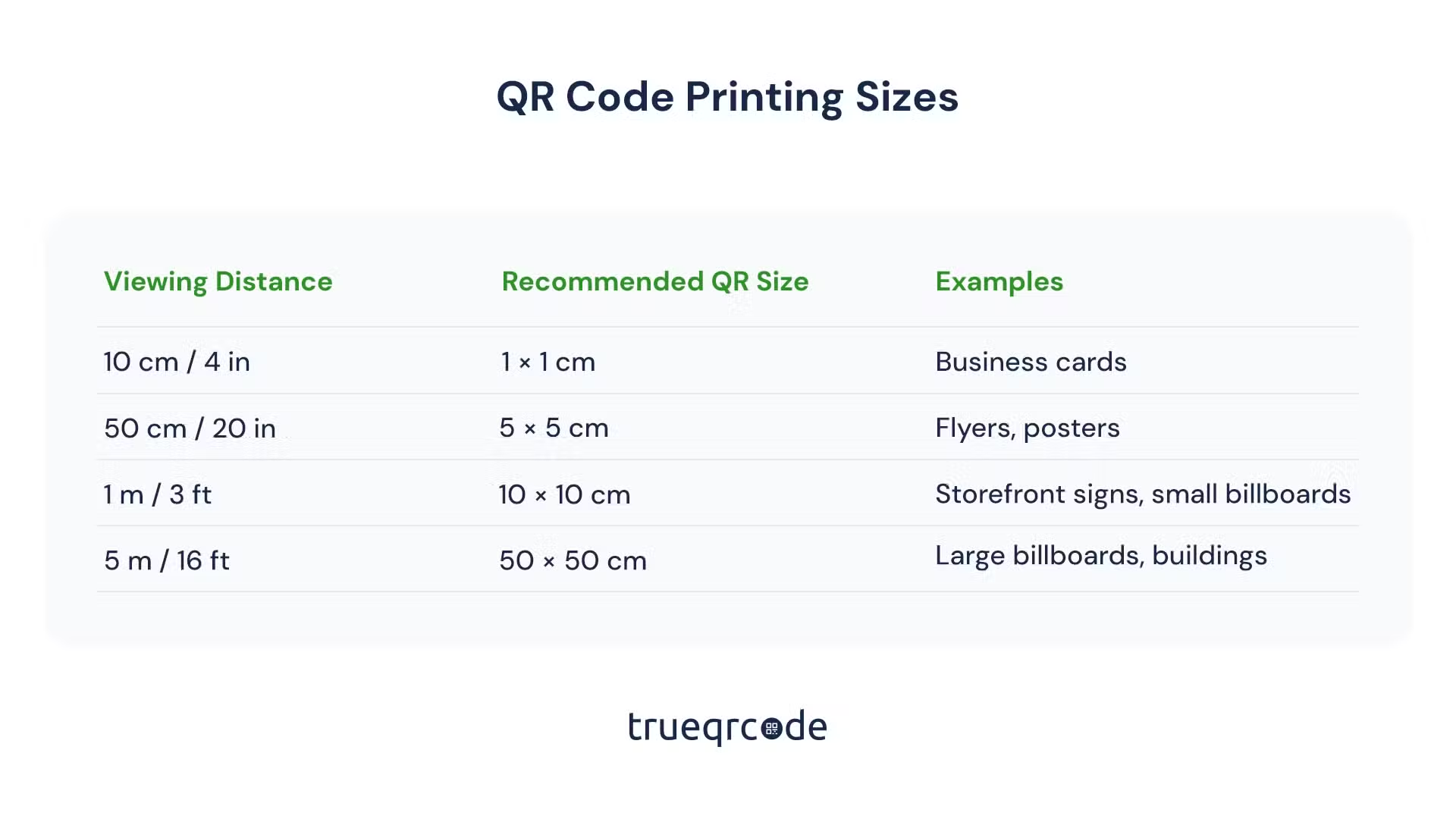
QR code dimensions can vary based on how big the material you’re printing on, and how far away it is. A QR code for printing on a billboard would be much bigger than if you were to print a QR code on lipstick packaging. With evolving technology and QR code scanners in phone apps, it’s becoming easier than before to be a bit more flexible with sizing.
There is no fixed size to printing QR codes anymore. Here’s a practical chart about sizing. You can also ask a company that specializes in special printing cases about your specific needs and goals, especially if it’s something that’s never been done before, or something that you can’t test, like a billboard, or on the side of a building. Even QR code light shows have been done before!
A practical rule many printers and marketers use is:
Minimum QR code size ≈ scanning distance ÷ 10
Print QR codes with contrasted colors
You can incorporate branding into your QR code design. Our easy-to-use tools make it fun for you to customize QR codes. You can use a color picker, or if you know the HEX code i.e. (#000000), you can enter that directly into the QR code generator. Please be careful with color pickers that are Chrome extensions, as they give viruses. Use the browser inspect element and click anywhere to see the HEX code come up at the bottom. Or, with Firefox, click the three horizontal lines in the top-right corner, select “More Tools,” and choose “Eyedropper.” You can Google search whatever works best for you and your device.
However, you’re going to have to make them contrast. No contrast, no scan. Also, neutral colors don’t really scan well either. There are some out there you wouldn’t think of, like white QR codes on cups that scan better when the drink is full!
Corporate marketing teams and designers already know how to play with their QR code logo and custom colors during the holidays to enhance different campaigns or evolve with company branding standards. But for those of you who run SMEs, don’t contract designers, or are independent contractors who want to have fun, our tools work the same just for you! We’ve designed our platform so anyone can create and enjoy QR codes, maximizing campaign success.
Printing QR codes on special materials
You can print a QR code on anything as long as there is high contrast, the modules are readable, and there is enough resolution and a quiet zone. You can form QR codes with lasers, lights, smoke, drones, or on metal, buildings, t-shirts, etc. Some innovative examples are below if you’re really looking to print QR codes in an extreme way.
Drones act as modules
Drones can form a QR code in the sky, as has been done all over the world now. It forms a beautifully lit-up show that people can scan from a distance. Trying to align and stabilize them must be done by professionals.
T-shirts and other fabric surfaces
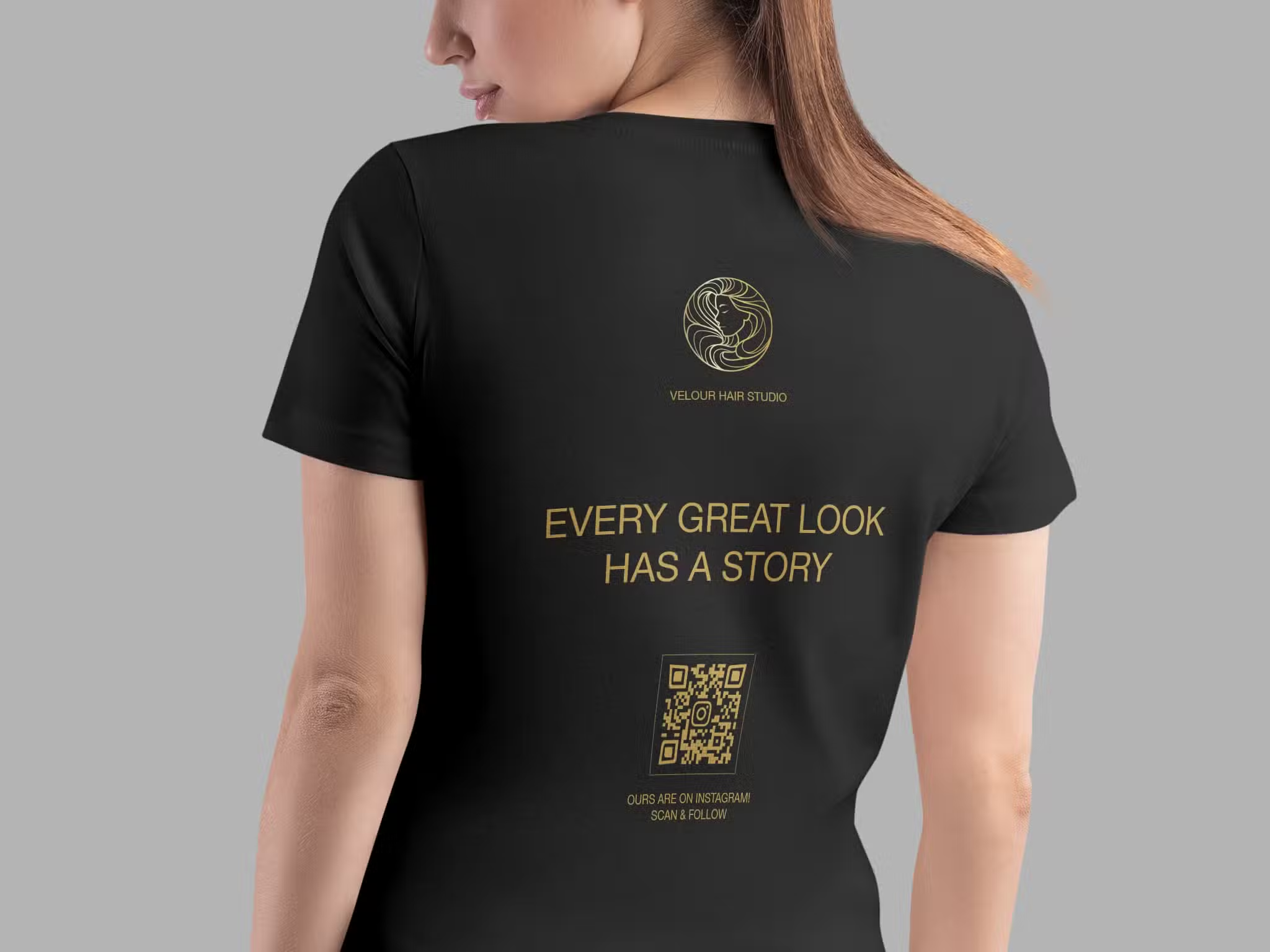
You can contact a screen printer, do embroidery, or heat transfer QR codes onto fabrics. You would need to incorporate the QR code in the same way as you would with any other design when designing clothes. You have to try with one garment before making multiples to make sure it scans. Also, try the garment on so the QR code isn’t in folded or creased areas, and people can scan it where you put it.
Printing QR codes on metals
These are extremely common in aerospace, engineering, serialization of high-end products, military equipment, and machinery parts. You would need a manufacturing company to tell you the best method to print QR codes on metal. They use different means of doing so and make sure they aren’t on glossy surfaces. Many times, they’re just a part of the parts you ordered, and it’s done for you.
UV, infrared, retroreflective QR codes
Some QR codes can be used for anti-counterfeiting and scanned under a UV light. Or infrareds that aren’t seen by the human eye, or retroreflective for the automotive industry.
Trueqrcode QR code generator can help you create, design, download, and track all of your QR codes. When printing on marketing materials or packaging materials, you would just incorporate your code into the material, print one test, do a test scan, and that’s it. For any of the cases above, you would need to contact professionals to help you, as you would with any design, but of course, you can still use a Trueqrcode QR code.
How to make and print a QR code
We’ll show you how to make a QR code in minutes with our easy-to-use QR code generator. Then, you can print QR codes however you choose.
- Go to Trueqrcode QR code generator and decide between our QR code types.
- Enter the content that is requested in the designated areas. This will vary depending on the code you choose.
Website QR Code – enter the URL
PDF QR Code – upload your PDF
GS1 Digital Link AKA (Barcode QR Code) – enter your GTIN, headers, product information, URLs, and socials
Multi-Link QR Code – add your headers, image, socials, and URLs
vCard QR Code – add your contact information, image, and socials
WiFi QR Code – enter your access setup and header
- For the Multi-Link, vCard, and Barcode QR Codes, you’ll be prompted to design a QR code landing page. It’s a linktree format that displays all of the information so people can click on multiple links. You just add your branded colors and an image.
- Now, work on your QR code design. You can also add branded colors. Make them contrast. QR codes with logos tend to perform better than those without.
- Add a frame with a CTA, or leave it out in the generator, and add a valuable CTA to your materials below the QR code. No matter where you put it, you need a short and sweet CTA.
- Download and do a test scan to make sure all of the links go where you want them to.
- Now, print your QR code wherever you want. If it’s on multiple items, do a test scan on one before printing thousands. If it’s on a building or a drone show, higher professionals!
- Take advantage of QR code tracking to analyze your campaigns. You can see how many times the code was scanned, in what cities, the time and days it was scanned, and on what devices. This will help you with A/B testing and any red flags that may come up.
Our final thoughts about printing QR codes
You want consistent, well-thought out marketing campaigns that will accelerate your goals and convert leads to customers. Whether your goals lie in brand awareness, recognition, or just printing QR codes on cups and other cool party favors for your friends, printing long-lasting, quality, scannable codes on any material is necessary.
