QR Codes with Multiple Property Links for Real Estate Marketing

poster on a building with qr code for real estate marketing
QR code for Real Estate Agencies on a white and purple car

Get every opportunity using QR codes for real estate marketing! Add videos, images, virtual tours and walkthroughs, booking calendars, event calendars for open houses, and more.

Instead of counting on email marketing and traditional paper methods, use trackable QR codes with analytics that empower you to modify campaigns based on consumer behavior. Printing QR codes on marketing materials allows potential buyers to take information home with them in their smartphones. It also ensures no one loses your contact information, maximizing business.

Use our multi URL QR code generator to link multiple properties to the same QR code and easily change out the links when properties have been sold. This gives a competitive edge to real estate agencies and to potential homebuyers that need relevant information instantly.

Benefits of QR Codes with Multiple Property Links for Real Estate Marketing

QR code technology for real estate marketing optimizes campaigns, and these are just 5 benefits of using them in comparison with traditional marketing materials.

Real estate QR codes empower you to track and modify campaigns

What can your multi-link real estate QR code track? This data is gold for identifying questions that used to be unknown regarding traditional marketing campaigns with paper brochures.

  • Number of times the QR code was scanned – Good for knowing how many people are engaging.
  • Clicks per link – This is fantastic for seeing how many people are interested in a certain property. It’s also necessary for A/B testing, so you realize what works and what doesn’t.
  • Time and days of scans – Useful for finding out potential buyer availability and when they are stopping by the place you printed the QR code.
  • Cities of scans – This metric is helpful for evaluating where people are actually interacting with your codes if you printed multiple ones. You also need to think about where you’re printing them in terms of convenience, foot traffic, etc., and we’ll explain that more in depth below. 

Dynamic QR codes are editable without reprints

When you want to switch out a link, just enter the Trueqrcode dashboard and enter the new URL. Dynamic QR codes are editable, so you can update information whenever you want without reprinting the physical QR code.

Information is stored in peoples’ smartphones

What happens when someone scans a Multi-Link QR Code is that a QR code landing page comes up with different options to click on in a linktree format. Landing pages are hosted online and not downloaded to a person’s smartphone like a PDF. The landing page is automatically generated with your QR code. In the mobile browser history, as with any website people click on, is where any URLs will be stored. So when someone clicks on the links in the landing page, it will be there. This is more convenient than paper brochures that get lost and misplaced.

Printing QR codes saves time and money compared to traditional marketing materials

Brochures and flyers are a gamble. You never know if you’re going to run out or if you’ve printed too many. They cause paper waste. They are expensive. They are not trackable. 

QR codes allow those who want to scan to do so and save the information in their phones. This eliminates trying to figure out an appropriate number of flyers to print, and sometimes people steal all of them and throw them all over the ground.

QR code tracking helps save time and money because if something’s not getting attention, just modify it in the QR code dashboard or, modify your content if it’s getting clicked on but there’s no further engagement. You don’t need to reprint the code on materials. 

QR codes are multi-functional

The use cases for QR codes are vast, and depending on your goals, you can get creative however you see fit for amplifying your campaigns.

How to Create QR Codes with Multiple Property Links for Real Estate Marketing

In this section, we’ll tell you how to generate a QR code for real estate marketing success:

Step 1: Go to Trueqrcode QR code generator and choose the Multi-Link QR Code option.

Step 2: Add the QR code landing page header, description, and main image.

Step 3: Add multiple URLs with interesting titles, such as “5 Bedroom Home in Haarlem”.

Step 4: Add an image of the property to each one.

Step 5: Add social network links next to their corresponding logos already provided in the platform. 

Step 6: Click the design tab, and add branded colors, to the QR code landing page. The tools are easy to play with and fun to use. You can even take the HEX code (i.e.: #D1D5DB) from your company website and add it to your landing page, or to your QR code.

Step 7: Click the next button and now design the QR code with branded colors and you can create shapes and frames that are appealing to the eye and that maintain consistency across your marketing channels and materials. Keep in mind what it will be printed on and that it matches well. Use contrasting colors so it scans. Even change it up for holiday seasons!

Step 8: Download the QR code and do a test scan. This is not optional. Test every link to make sure they are accurate. Then test them on one printed material before printing hundreds.

Step 9: Our QR code generator with analytics enables you to track your campaigns. Take advantage of this feature to modify what’s best for you and potential home owners.

QR codes on Catalogs for real estate with a man and lady in front of a property
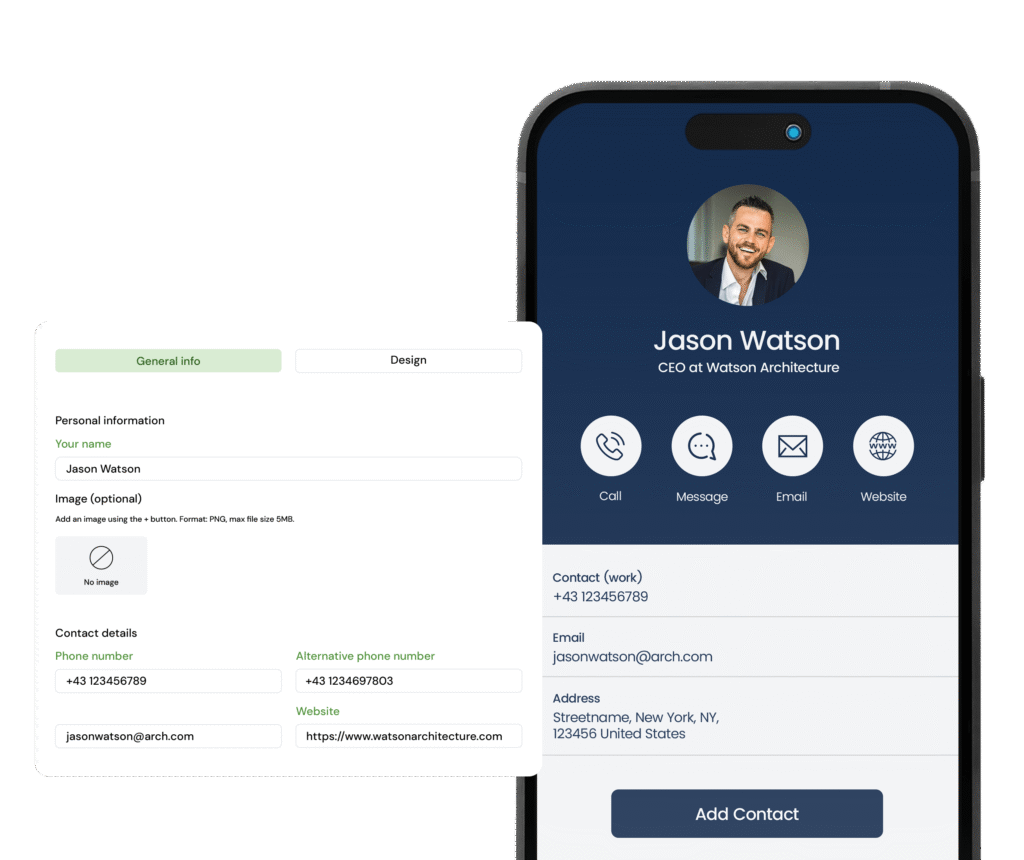
vCard QR Code Generator with phone contact input fields and a blue landing page with an image of jason watson

Best Practices for Using QR Codes with Multiple Property Links for Real Estate Marketing

These are some suggestions about using QR codes for real estate effectively.

Print QR codes on window displays

Those listings on displays in your window get a lot of traffic after hours. Instead of interested buyers taking pictures, print a QR code for your listings so they can get all of the information in one place.

Add QR codes to signs outside of properties

In lieu of printing brochures and flyers that get lost, tossed, or stolen, add a QR code to signs that give people information about your listings and your contact information.

Replace printed brochures with PDFs

Printed brochures are expensive and wasteful and when homes get taken off the market, sold, or your agency makes changes, they are null. Take the PDF you would have sent to the printer and add it to your linked URLs as downloadables. 

Or, make a PDF QR Code for each brochure and batch generate QR codes for different uses.

Create QR codes in bulk

Bulk QR code generation is great for large or personalized campaigns. Depending on your needs, you may choose to create different QR codes instead of one for many listings. For example, you can create a Multi-Link QR Code for every listing with links to different information about it. Or, maybe the PDF QR Codes work better for you for each listing. Whatever your objectives may be, we offer different types of QR codes that can work for you. 

You can also create a vCard QR Code for each agent and print them on business cards. QR codes on business cards enable the scanner to download the contact information of the agent immediately, to eliminate errors, typos, and searching for them on social media.

Add catchy titles on landing pages for URLs

No matter what you edit on your website, the QR code will always go to the URL you directed it to. The only time you would need to edit the actual QR code on the backend is if the URL changes. Or, if the listing on the same webpage is now replaced with something else, you need to rewrite your title on the QR code landing page. Maybe the “5 Bedroom Apartment Facing Central Park” has been sold, and now that URL features a “3 Bedroom Apartment with a View of the Skyline.” Then you wouldn’t change the URL, but the title of it that you chose in your content section.

Tips for Making QR Codes with Multiple Property Links for Real Estate Marketing

Use these QR code tips to create real estate marketing campaigns that stand out from the rest.

Customize QR code designs with your logo

QR codes with logos are proven to perform better based on analytics. It gives your agency or personal brand a nice touch for awareness and recognition.

Take analytics into account

Analytics will give you insight into if, when, and why people are scanning. This step is necessary to adjust campaigns or content to suit homebuyer needs.

Test scan and click on links before launching

There’s nothing worse than a QR code that is null. People get frustrated and move on. Make sure it scans, is conveniently printed, and that all of the links go to the correct URLs before launching the QR code.

Provide a clear call to action

Tell people why they should scan the code. For example, “Scan here for virtual tours” or “Find out information about our current listings.”

Think about where you’re printing the QR code

Your real estate marketing QR code needs to be in a place where it can easily be scanned. People are not going to try if it’s inconvenient, too far away, or blocked by something.

FAQs

Here are the top 5 FAQs and answers for using QR codes in real estate marketing:

QR codes for real estate marketing can link to multiple properties, listing pages, virtual tours, booking calendars, open house schedules, real estate agent contact forms, agency contact information, mortgage calculators, and downloadable PDFs in lieu of paper brochures.

Place real estate QR codes in areas like window displays, yard signs, free merchandise, business cards, mailers, and even an agent’s car.

Interested buyers can keep information stored in their cell phones, and when it is easy and convenient to contact and interact with their agent based on tangible information, leads and engagement increase.

They can track:

  • The number of scans
  • Times
  • Days 
  • What links are getting clicked on
  • iOS or Android devices

This helps agents know if codes are being scanned, and if certain times and locations are more fruitful, unlike paper campaigns that remain without data. It’s especially helpful knowing what links are more useful and what can be changed.

  • Ensure you have a valuable reason to scan like, “Check out our virtual tours for our most recent listings.” 
  • Make sure all of your pages that are linked to your QR code are mobile optimized.
  • Brand your QR code with your logo.
  • Print them in places that are convenient to scan.