Google Review QR Codes

QR code for reviews on a table tent at a day spa
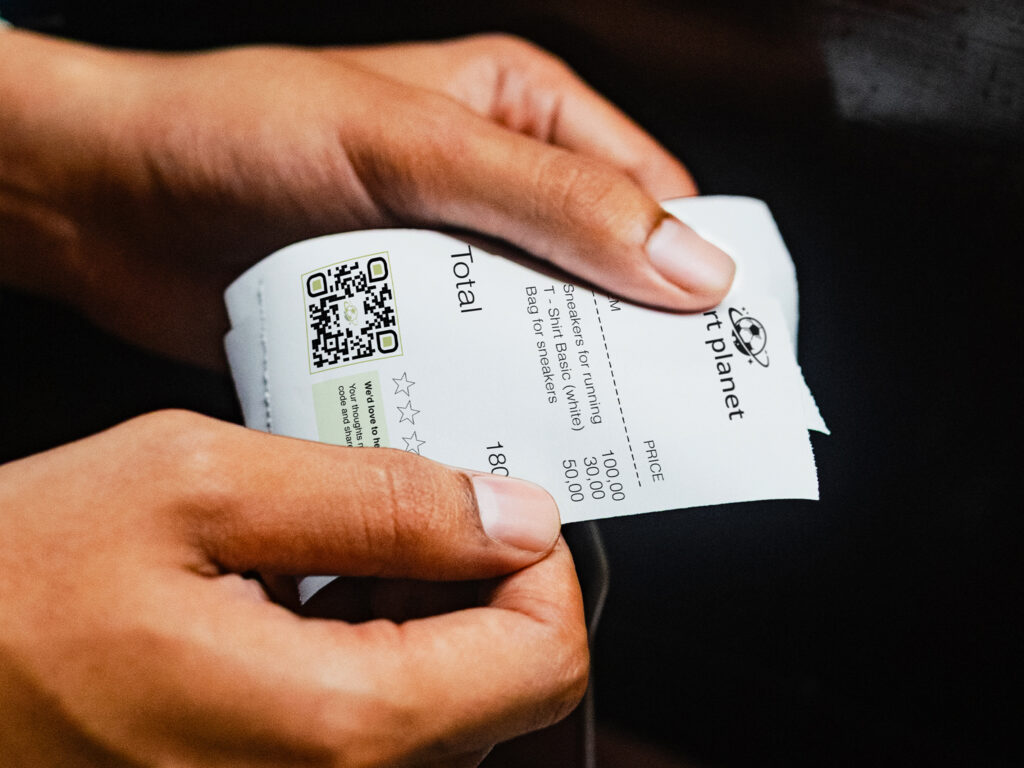
a lady's hands holding a receipt with a qr code for reviews

A Google Review QR Code gives customers a convenient way to scan and leave you a Google Review immediately. Simply add your Google Business Review link to your QR code, and watch reviews increase quickly. This eliminates having to search for the business online. 

If you want to encourage continuous feedback, add Google Review QR Codes to receipts, table tents, posters at events and venues, bags, brochures, and more.

Benefits of Google Review QR Codes

While the benefits of QR codes span a wide range of topics, you can think of a Google Review QR Code as a catalyst to spread brand awareness and recognition across your region.

Improve your Google local-pack ranking factor

When you have recent, quality reviews, Google’s algorithm makes your company a priority, ranking you at the top of businesses in your category in their search engines like Google Maps. Continuous feedback is a great way to expand your local visibility, even without having a content manager. Having strategically placed Google Review QR Codes that are convenient to scan, without constantly begging for reviews, inevitably improves your Google local-pack ranking factor.

Create Google Review QR Codes in bulk for franchises

For a different Google Review QR Code at each location, create QR codes in bulk. You can download the .csv from our QR code generator and input a different Google Business Profile review link in the URL column for each location. This enables you to create multiple QR codes at once, while keeping the QR code design consistent across all locations. 

Google Review QR Codes direct users straight to your review page

No more searching for a company’s information online. When you embed your Google Review link in your QR code, you enable customers to bypass searching and finding competitors or one of your other locations by mistake. The convenience makes the process a lot easier, increasing the number of people who will leave you reviews.

Google Review QR Codes are customizable

Design eye-catching Google Review QR Codes that are sure to attract scans. Add a valuable incentive with a CTA that makes your audience want to leave a review. You can add branded colors, a logo, and change designs for holiday campaigns. 

Dynamic QR codes are trackable

QR code tracking empowers you to see how many people scanned your code, at what locations, on what days, and during what times of the day. With that information, you can adjust campaigns so you know where it’s more beneficial to print QR codes, and how many people are actually leaving reviews after they scan. You can check review information in your Google account, not in the QR code generator dashboard.

How to create Google Review QR Codes

You can generate a Google Review QR Code with just a few easy steps. Here’s how: 

Step 1: Go to Trueqrcode QR code generator, and choose the Website URL option.

Step 2: Enter your Google Business Profile review link.

Step 3: Customize your QR code with branded, contrasting colors so they scan well, and do a test scan so that you know it works before printing the QR code on marketing materials, and to ensure it goes to the correct link. It should also have enough white space around it to scan. 

You can also learn how to use QR code templates so you can keep the same designs for various QR codes and purposes across different marketing channels for brand consistency.

Step 4: Download and save your QR code in your account. Name your files and organize them in folders so you can refer to them later for editing and future campaign creation.

Step 5: Print the QR code. Do a test scan after printing in different light and with different devices.  

Step 6: Our QR code generator with tracking allows you to track campaigns over time and modify them as needed.

a qr code in a black and gold luxury hotel brochure
a yellow review QR code on Stationery for home repairs

Best practices for Google Review QR Codes

Increase post-purchase engagement and continuous feedback with Google Review QR Codes. Here are the most creative and practical ways to get people scanning and taking action.

Print Google Review QR Codes on table tents upon checkout

Whether you’re at a day spa, a hotel, in a waiting room, a lobby, or a restaurant, QR codes on table tents grab your audience’s attention so they can leave a review on their way out.

Leave QR codes on receipts

QR codes on receipts boost continuous feedback and foster post-purchase engagement. With a Multi-Link QR Code, you can make a QR code landing page with multiple links that allow people to leave reviews, follow you on socials, make repeat purchases through ecommerce stores, and more.

Service-area businesses (SABs) can print Google Review QR Codes on invoices

For businesses on the move, like plumbers, repairmen, cleaning services, etc., they can add Google Review QR Codes to invoices, business cards, and brochures to spread company awareness. This will help increase their Google local-pack ranking factor as well, although they don’t have a storefront. Businesses will rank higher on Google and Maps in that area. 

Ask for reviews during post-purchase communications

If you have email subscribers, adding your Google Review QR Code to the end of your newsletters helps, especially with repeat customers that have a solid relationship with you. You can also print QR codes on product packaging, so when they enjoy their purchase outside of your store, they’ll be reminded to share an honest review.

Use Google Review QR Codes to help build your continuous feedback strategy

You don’t need to have one channel to receive continuous feedback. Nor do you need to keep asking customers on their way out the door to leave reviews. You can compare different placements by testing receipts versus table tents, packaging, or counter signage. Then, use scan data to understand which placements attract attention. You also aren’t limited to printing them in one place. However, they don’t need to be printed on every surface or material either. You can also create a QR code for multiple links and add a link to your review page there.

Tips for making Google Review QR Codes

These tips will help you get started regarding QR code creation, strategy, and how to ask for reviews professionally.

Give an incentive for scanning a Google Review QR Code

Invite honest feedback instead of five-star reviews. Incentives are great when people are encouraged to take action because they want to rather than feeling obliged to. 

Add your logo for brand recognition

QR codes with logos perform better, period. You foster customer trust and loyalty when they associate your logo and branding with having a good experience.

Add a worthwhile CTA to your QR code

Leave a friendly message letting people know exactly why you want them to scan. Here are a few ideas to get you going:

“Share your experience on Google.”

“Enjoyed your visit? Leave us a review.”

“Help others discover us—review us on Google.”

Ask at the right time and place

Request feedback after a completed purchase, meal, service, or positive interaction. You’ll have to consider which marketing materials or surfaces those are when people are done with their experience in your business. Avoid interrupting customers during the experience.

Take action on the feedback given

Giving feedback is worth it for the customer when businesses take action on complaints. When it’s time to improve an aspect of your business, make the change. Your continuous feedback will improve when your business does.

FAQs

Here are some FAQs and their answers about creating your first Google Review QR Code for continuous feedback.

Trueqrcode offers affordable business packages to keep codes secure, safe, trackable, and forever yours. Check out our QR code prices here.

Yes, but you need to track your actual reviews in your Google dashboard, not the QR code dashboard.

You should print them on materials or surfaces that are scannable, convenient, and seen post-purchase.

Only good products and services guarantee five-star reviews. A convenient QR code is sure to boost more reviews.

They are definitely another way to catalyze that. The more reviews you get, the higher your local visibility is, even if you’re a serviceman in the area without a storefront.