Brands add logos to QR codes to increase brand awareness and boost consumer trust. QR code logos enhance consistency across marketing channels, making them a perfect match for current marketing materials while being flexible enough to change up for evolving themes and seasonal promotions.
The most important thing about creating a QR code is its scannability. So just how big can a logo be in the center of your QR code before it stops scanning? The typical recommendation is not bigger than 15-20% of the QR code, and never cover the eyes (corners) of the code. QR codes can be scanned as long as not more than 30% of it, nor the eyes, are damaged.
Therefore, branding can meet scannability successfully.
Why logos work in QR codes
QR codes are built to have error correction, meaning if there is something obstructing the code, like damage or dirt, scannability can still happen. That means if the QR code logo size exceeds about 20% of it, you’re taking a risk. It’s easy to create beautiful and functional QR codes with logos that aren’t bigger than 15%. That means we’re taking up some of that error correction space.
The magic of QR code error correction levels
Thanks to error correction, the data embedded in the QR code can still be scanned successfully without every single module being visible. So if your QR code logo size stays within the error correction parameters, you’re good.
15-20% are recommended for a QR code logo size. You don’t want to push it at higher levels, in case damage to the code were to happen. It’s easy for codes to get scratched and dinged up when they’re printed on places like tables or on shipping boxes.
The Four Error Correction Levels
QR codes support four error correction settings:
Level | Approximate Recovery Capacity | Typical Use Case |
L (Low) | 7% | Clean digital displays, maximum data capacity |
M (Medium) | 15% | General-purpose QR codes |
Q (Quartile) | 25% | QR codes exposed to moderate wear or customization |
H (High) | 30% | Branded QR codes and challenging environments |
Level H correction mode
Here we’ll talk about correction levels vs. actual QR code size. QR code generators will go into (H) high error correction when adding a logo because the scanner can then reconstruct more missing data. It’s the largest margin for branding elements, so the tolerance can compensate for additional things such as shapes, colors, print defects, dark lighting, etc. But this doesn’t mean you actually add a logo that is 30% of the size to the QR code. You still keep your QR code logo size at 15-20%. Level H QR codes mean that there is 30% recovery capacity, not that the QR code logo size should equal that percentage. Without high error correction, the scanning performance would decrease.
Therefore, QR code logo size vs. error correction levels are not one and the same.
Density vs. QR code logo size
The more data a QR code stores, the more modules it needs to encode information. This is also important to remember for QR code printing, as you would need to consider the size of what you’re printing on. Not to digress, the density matters, so if your QR code size is too big, you’re covering more modules that need to store data, which can reduce scannability. This is why QR code generators use a URL shortener, especially for URLs with UTM parameters, because encoding more data creates a denser code.
Less dense = higher scanning performance.
But this doesn’t mean you reduce the information. You can still outperform competitors and create quality QR codes that last with a lot of information, like those stored in GS1 Digital Link QR Codes and Multi-Link QR Codes. Just make sure your QR code logo size doesn’t exceed 20%.
What happens if the QR code logo gets too big?
If your QR code logo size exceeds 25-30%, you’re pushing error correction limits. The data recovery capacity will reduce, as it would be taking up too much space on the modules. This means that scanning performance will be slower, making your audience frustrated. You only have a few seconds to impress your audience, or they move on to something else. If there is more than 30% obstruction, it would mean complete scan failure.
Performance factors apart from QR code logo size
- Use contrasted colors so it scans. Neutral colors don’t scan well.
- Use a URL shortener, which is automatic in most QR code generators.
- Create dynamic versus static QR codes. Dynamic QR codes are editable and can handle more density. Moreover, they offer more QR code types and QR code tracking, which is important for seeing how many scans you’re getting, times, and locations, and effectively modifying campaigns.
- A larger physical code can tolerate a larger logo, considering our aforementioned factors above.
- Quiet zone requirements are 4x the size of a module, all around the code, also referred to as the white space.
Test the QR code
Before printing, test scan the code on different devices. The first test is to make sure it scans, and your URLs are linked correctly. There’s nothing worse than launching a code that is null.
You also want to take into account the printing size regarding the distance.
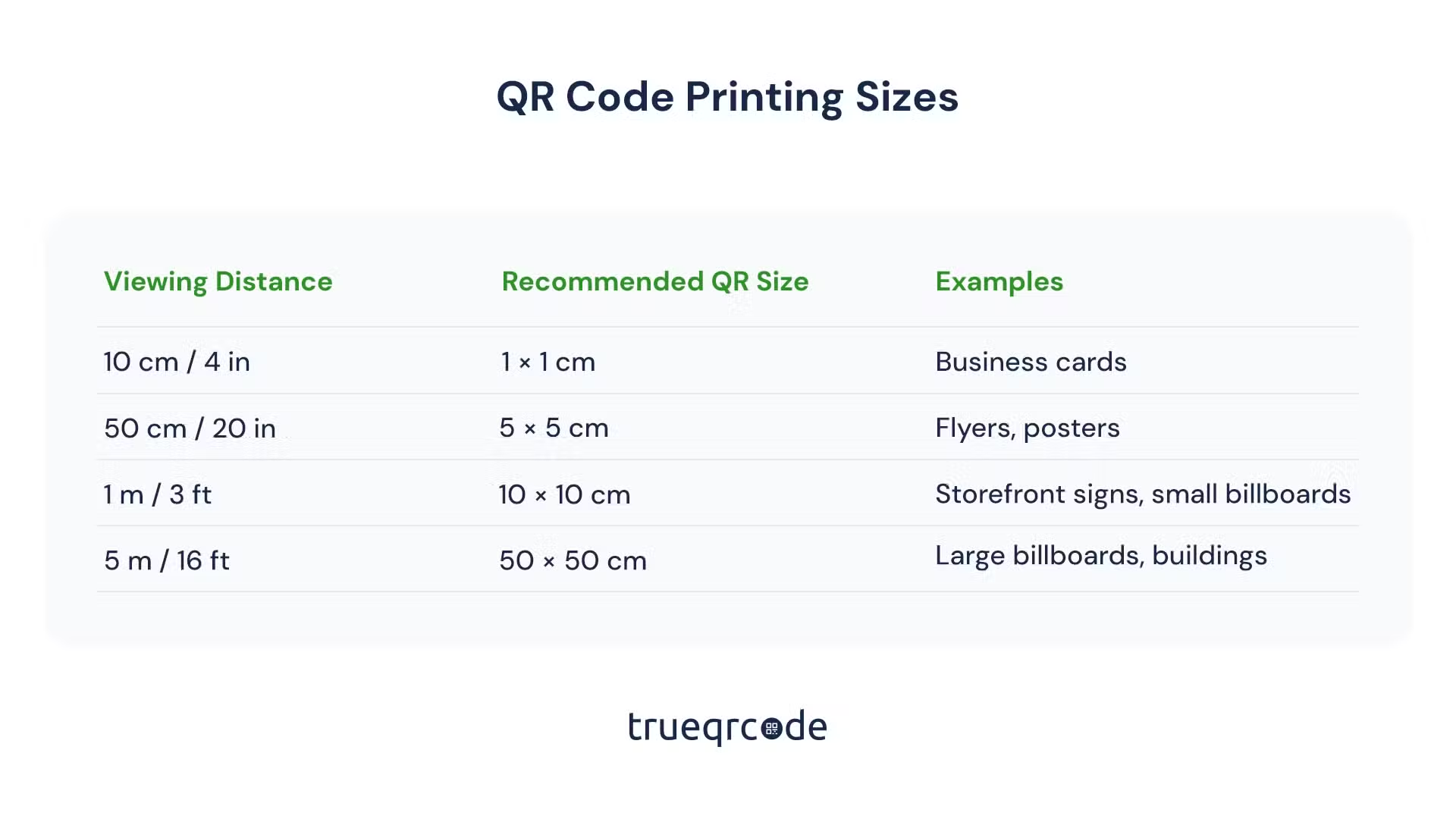
The second scan on printed materials allows you to see if the material it’s printed on works. Please check out our QR Code Printing guide for details. If you’re printing the code on multiple materials, test print on one and scan before printing multiple copies. This goes for packaging, flyers, business cards, etc.
