QR Codes on Posters

QR codes on a black sign in a bar with a brick wall
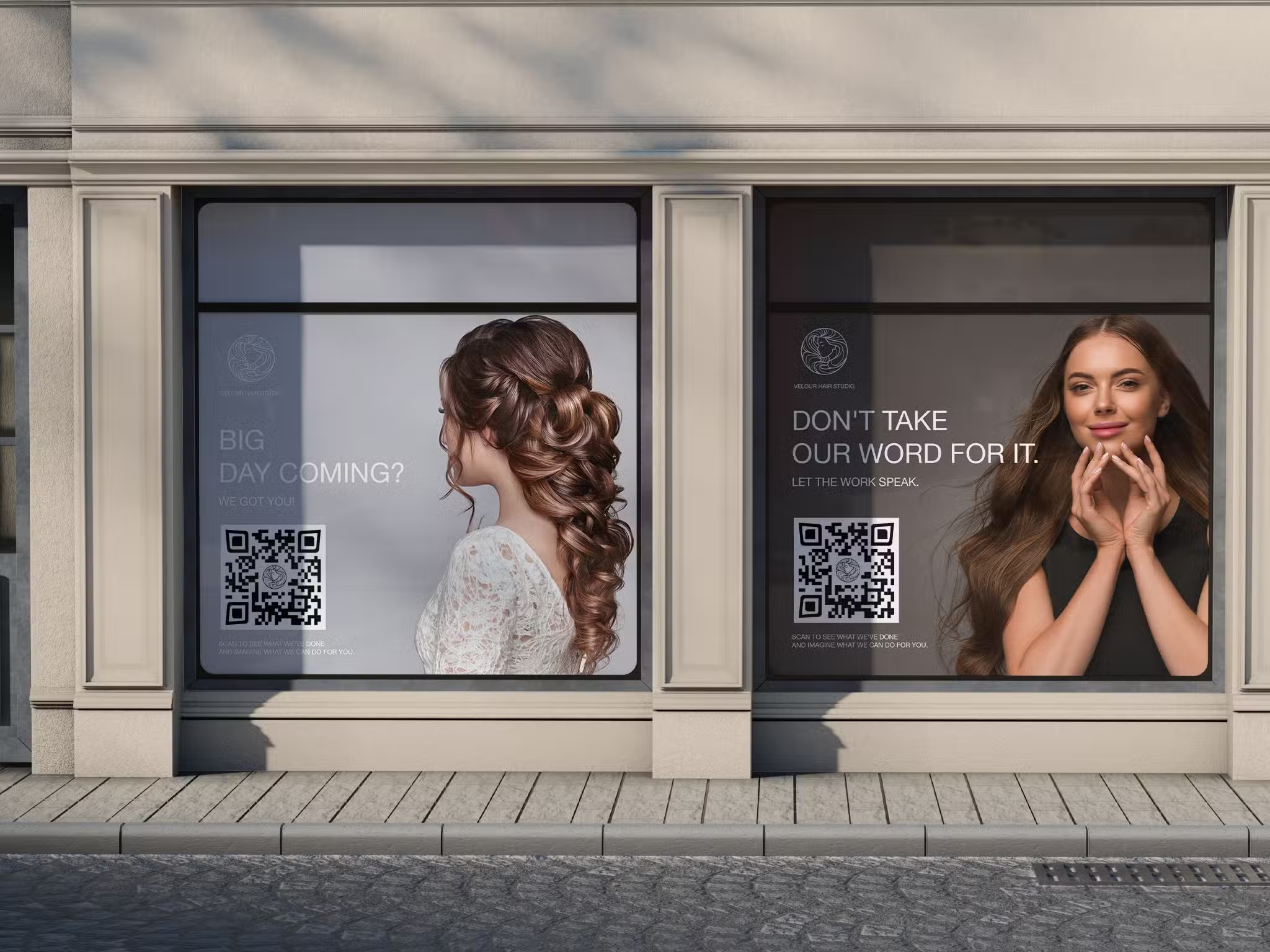
2 displays with women with hair done for salon advert with qr codes on them

No matter where you look, creative QR code poster designs are popping up everywhere. Whether at a public event, a business conference, a concert, an art show, a university campus, or a beauty salon, you name it: a QR code on a poster is there. If you want to attract more visitors to websites, share booking calendars, get followers on social media, share music, art, videos, and more, a QR code on a poster is definitely the way to do it. Put your poster in a classy frame, or on a storefront display; there are so many ways to increase engagement and share content using creative QR code poster designs.

Benefits of creative QR code poster designs

Where one-dimensional posters used to survive, adding a digital connection with useful content that can be stored in cell phones is what now thrives. Give video, audio, social, and multi-use content to the masses by placing a QR code on what used to be a basic poster

Turn boring advertisements into action

Printing QR codes on posters transforms a regular advertisement into a two-way engagement channel with your audience. Creative QR code poster designs don’t only attract scans; they inspire customers to follow you, participate in offers, and take action. Traditional advertisements don’t add digital experiences.

Expand your audience

Get your name out there and experience real growth. When you offer useful content, you go beyond just reaching customers and increase brand awareness across a wider audience.

Give your brand a competitive advantage

Using QR codes on posters empowers you to deliver digital content straight to people’s smartphones that you couldn’t do with traditional advertising in the past. When you have something to offer that your competitor doesn’t, and it goes home with the audience in their cell phones, you remain memorable.

Track your QR codes

You can track QR codes by number of scans, time and days scanned, cities they were scanned in, and on what type of device. This enables you to see where your campaigns are doing their best and adjust them accordingly. You can also track QR codes with multiple links to see how many clicks you’re getting per link, which makes it clear if you need to add, remove, or modify content. 

Edit dynamic QR codes

Many people wonder how to edit a QR code. It’s simple!  You just go into your dashboard and edit it the same way you created it in the first place without physically reprinting the code. This means you can change and edit links when necessary.

How to Create QR Codes for Posters

Maximize your marketing efforts by turning regular posters into digital connections! Creative QR code poster designs empower you to take traditional campaigns a giant step further.

Step 1: Go to Trueqrcode QR code generator and choose the QR code type that best suits your needs. 

Step 2: Add your content, links, and social media channels.

Step 3: Customize your QR code with branded, contrasting colors so they scan well, and do a test scan so that you know it works before printing the QR code on the poster. It should also have enough white space around it to scan. You also have the option of making a QR code template for brand consistency across different campaigns and marketing channels.

Step 4: Download and save your QR code in your account. Name your files and organize them in folders so you can refer to them later for editing and future campaign creation.

Step 5: Use your downloaded QR code on your poster. Do a test scan after printing in different light and with different devices. If you’re printing multiples, try one first.  

Step 6: Our QR code generator with tracking allows you to track campaigns over time and modify them as necessary.

QR codes on Art on a display in the city
QR codes on Displays in a store with an asian lady who has a hat on

Best Practices of QR Codes on Posters

Looking for a few interesting examples of how to use creative QR code poster designs? We’ll show you some interesting ways you can incorporate them across different industries.

Print QR codes on concert and music event posters

Add a Spotify QR Code to your concert posters. Share samples of music with the world so you get more ticket sales, more followers, boost your recognition, and more. Now, take a one-dimensional, quiet poster, and turn it into a sound experience that people can listen to on their smartphones.

Incorporate QR codes on university posters

QR codes for schools are fantastic as a way to share event information, sign up for clubs, register for team try-outs, buy tickets to games and shows, and more! Making QR codes for events is the best way to share information with large audiences without causing paper waste from flyers.

Add QR codes to posters at beauty salons

QR codes for beauty salons enable you to share your social media pages like Instagram so people know what to expect when they receive your services. You can also add QR codes for portfolios with multiple links to show off your best work for weddings, celebrations, and everyday services. Multi-Link QR Codes allow you to add links to booking calendars, websites, price lists, and more that mitigate phone calls and paper brochures.

Make QR codes for NGO posters

Enhance your sustainability efforts with QR codes for non-profits. Let your audience scan QR codes that lead to charity and donation links, sign-up pages, registration to volunteer, and more information about the cause that you’re supporting. These are especially useful for NGOs that put up kiosks at public events, so they don’t have to carry around or spend money on paper prints.

Print QR codes on posters for conferences

Marketing with QR codes is better than traditional marketing, mitigating the expense and weight of bringing paper prints in heavy boxes to conferences only to find out there aren’t enough, there are way too many, or they’ve gotten tossed in the bin. Paper is also not trackable. If you’re interested in knowing how successful your networking events, conferences, and trade shows actually were, QR code analytics offer another channel to track campaigns.

Tips for Adding QR Codes to Posters

Making a creative QR code poster design is fun and easy to do with our simple tools. Whether you’re a novice or a designer, these tips will help your campaign stand out, and your codes scan effectively.

Test scan the code and check all the links

There’s nothing worse than scanning a code that doesn’t work. Don’t give people that experience. They won’t scan twice. You also need to double-check that all of the links go where they should. Although you can edit dynamic QR codes without reprinting them, you want to focus on how you can evolve campaigns according to consumer preferences, not correct errors that should have been checked the first time.

Make your QR code clearly visible

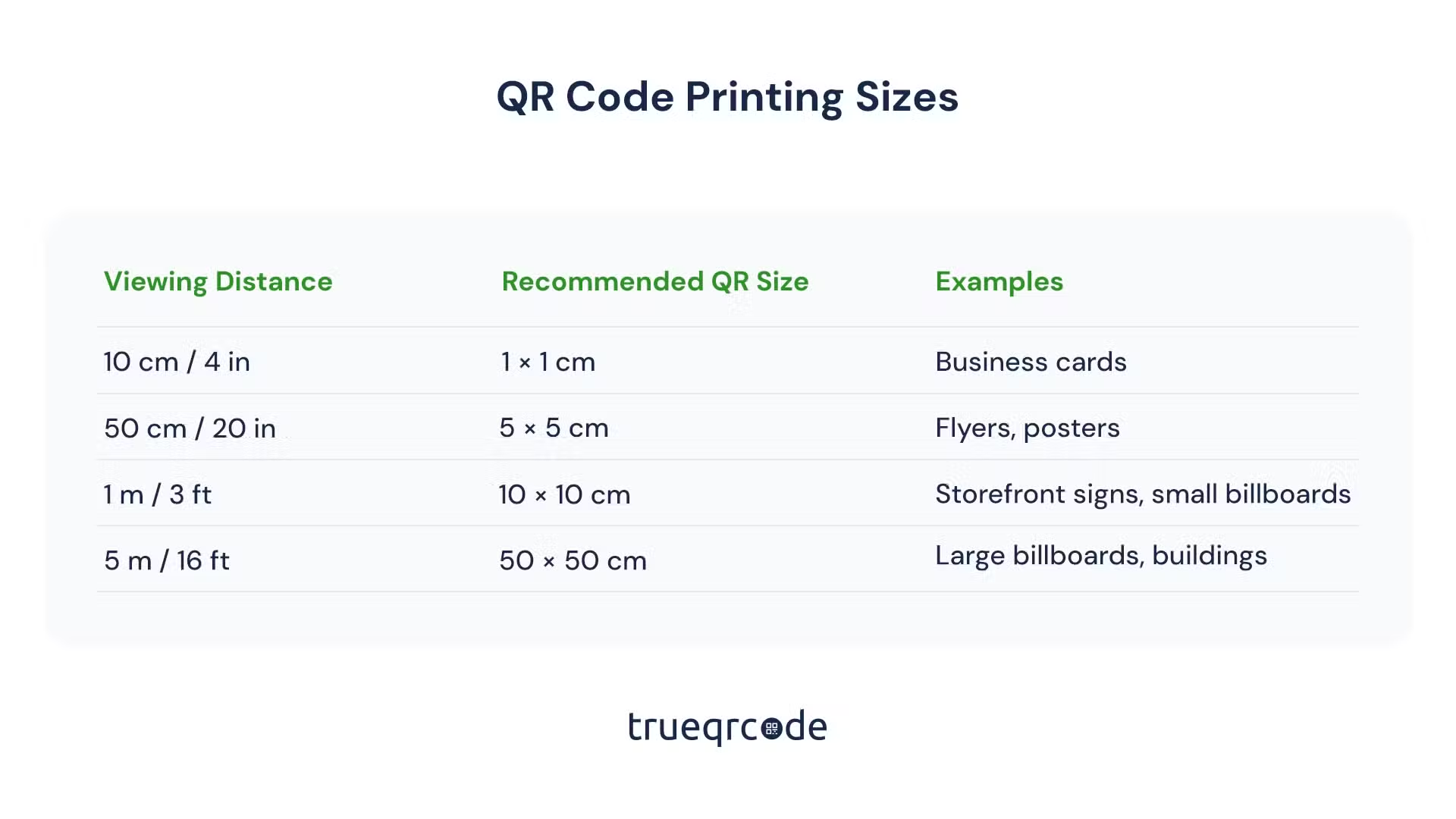
Make sure that your QR code is printed in an area where your TA will see it and be able to scan it easily. It needs to be convenient. It can’t be blocked by other things, and people shouldn’t have to bend or climb to be able to scan. The size and distance matter, so here’s a quick reference of how big it should be according to placement.

chart of qr code printing sizes

Add an enticing call to action

You can add a CTA to the QR code itself, or to the poster. Take into account that your creative QR code poster design will need to be appealing, and the call to action must inspire people to:

  1. Scan
  2. Take action

Both are necessary for a successful QR code marketing campaign. People need to know what they’re getting so it’s worth it.

Upload a QR code logo

Your creative QR code poster design should have a logo, as QR codes with logos tend to perform about 30% better than those without them, as they are eye-catching and foster consumer trust. The QR code logo size should be appropriate according to the size of the code and coincide well with the rest of the poster design. However, some advertisements may have an Instagram logo in the center, for example, that makes it clear they want you to follow, and the rest of the poster is branded anyway. You can decide what’s best for your campaign.

Analyze with tracking and A/B testing

QR code tracking is gold. By figuring out what gets people scanning, and analyzing where in your sales funnel people dropped off later, you gain valuable insights into what people want and need. Give A/B testing some time for longer campaigns. You’ll see that certain times and days lead to more traffic. With QR code tracking, you can see the number of scans, times and days of scans, cities QR codes were scanned in, and on what devices. You can also track clicks per link with Multi-Link QR Codes. Further analytics regarding your social media and websites can be performed in those places, not in the QR code generator dashboard.

FAQs

These are the most frequently asked questions and their answers about creating QR codes for posters

Yes. Our dynamic QR codes offer QR code tracking.

You can link to a QR code landing page that displays many links, or you can have codes that lead to one destination.

If you have a creative QR code poster design with an enticing call to action, your scans and engagement are sure to rise.

Yes, as a best practice, you should do A/B testing over time.

When you analyze your campaigns, you’ll see a clearer view of your success rate. That will look different for everyone depending on your industry and objectives.