Dynamic QR codes are changing the way businesses communicate with their audiences by offering greater flexibility and capabilities compared to static codes. In this detailed guide, we explain what dynamic QR codes are, how they work, their applications, and what to look for when choosing software.
If you’re a marketer, event manager, or business owner, you’ll get helpful advice on how to get the most out of dynamic QR codes.
What is a dynamic QR code?
A dynamic QR code is a versatile and trackable type of QR code that allows you to change the associated content without having to create a new code. Unlike static QR codes, dynamic QR codes use a short URL that directs users to the intended content on a server. This feature not only saves time but also makes it possible to analyze and monitor QR codes.
For example, a dynamic QR code can be used to link to a promotional campaign and then change the link to a different campaign without having to replace the QR code itself. This flexibility makes it a valuable tool for companies that want to stay relevant and optimize their strategies.
Static vs. Dynamic QR Codes: What’s the Difference?
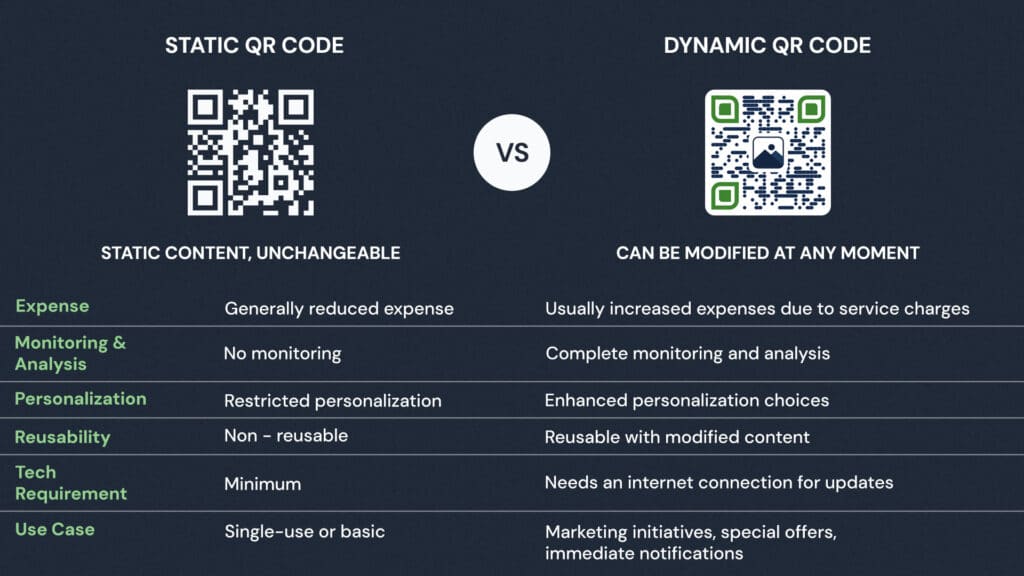
Static and dynamic QR codes serve different purposes based on flexibility and functionality. Static QR codes store fixed information that cannot be updated after creation, making them ideal for unchanging data such as contact information or plain text. However, they lack tracking capabilities, which limits their use for performance analysis.
On the other hand, dynamic QR codes are more versatile. Their linked content can be edited at any time, and they offer features such as analytics to track user behavior, scan locations, and device usage.
How do dynamic QR codes work?
Dynamic QR codes work by embedding a short URL that connects to a server hosting the desired content. When someone scans the code with a smartphone or QR reader, they are redirected to this server, and the linked information is retrieved immediately. Thanks to this seamless redirection, dynamic QR codes can deliver updated or modified content without having to regenerate the code.
In addition, the software used to generate these codes collects data from each scan, such as the location, device type, and time of use. This tracking provides valuable insights that can help companies analyze user behavior and effectively optimize their strategies.
What are the benefits of using dynamic QR codes?
Dynamic QR codes offer a range of useful benefits for businesses looking to improve their marketing and operational effectiveness.
Content Flexibility: Change the associated content at any time without having to reprint the QR code.
Cost-effectiveness: Use the same QR code for different campaigns, which reduces printing and distribution costs.
Performance Monitoring: Track user engagement, such as scan locations, times, and device types, to enable data-driven decisions.
Personalization: Improve brand recognition by creating QR codes featuring logos, colors, and calls to action that reflect your brand.
Enhanced security: Protect sensitive information with features such as password protection, access restrictions, and expiration dates.
Dynamic QR Code Use Cases
Here are some practical use cases and tips for maximizing the potential of dynamic QR codes:
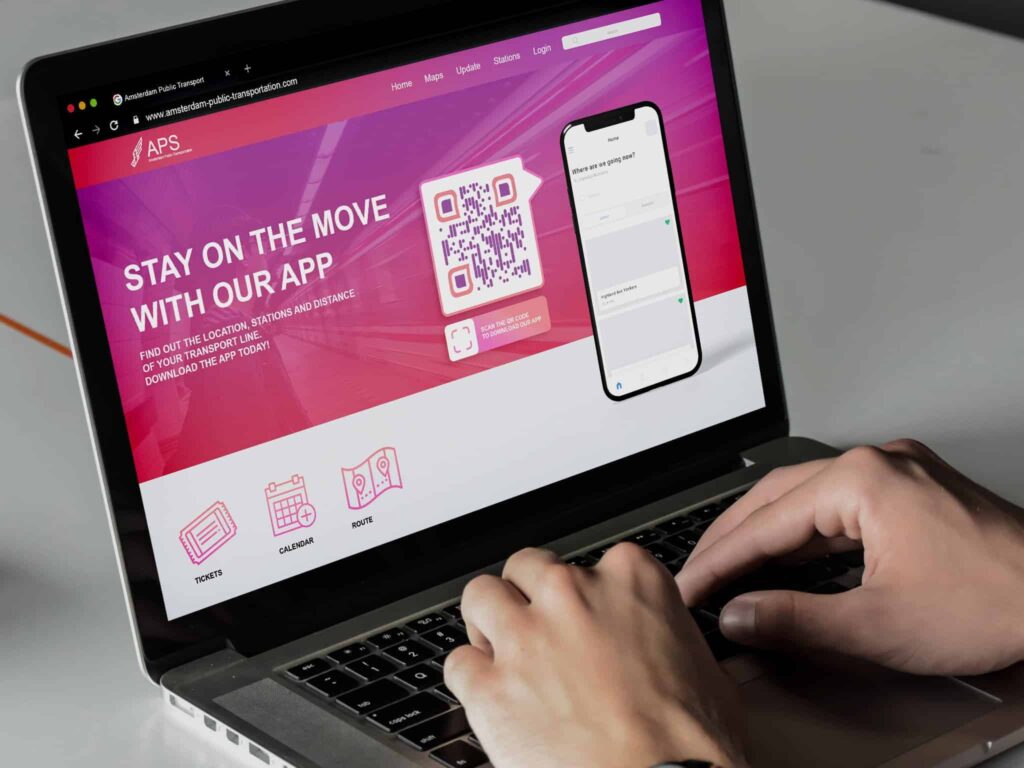
Marketing campaigns: Use QR codes to direct users to landing pages, special discounts, or product demonstrations. Add an engaging call to action, such as “Scan to save 20%!” to increase engagement.
Retail and E-commerce: Use QR codes on product labels to direct customers to reviews, guides, or purchase options. For e-commerce, combine them with loyalty programs or digital wallets to ensure smooth transactions.
Event Management: Streamline check-ins by embedding visitor information in QR codes. Link codes to event schedules or networking apps for a more seamless experience.
Health Care: Implement QR codes on patient wristbands or prescription labels to enable quick access to medical records, appointment systems, or telehealth services. Ensure data security through password protection.
Education: Place QR codes in classrooms or on study materials to give students instant access to online lessons, lecture notes, or engaging quizzes. Use them to gather immediate feedback during class.
4 Tips for Optimizing Your Use of Dynamic QR Codes
Do you want to get the most out of your dynamic QR codes? There’s more to it than just creating and sharing them. Here are four steps to help you unlock their full potential:
- Offer valuable content: Link your QR code to content that is both relevant and valuable. Whether it’s product details, a unique discount, or a helpful tutorial, make sure it’s something your audience is looking for.
- Monitoring and Learning: The great thing about dynamic QR codes? You can track them. Check regularly to see who is scanning them, when, and how often. This data can help shape your future marketing campaigns.
- Always test: Before rolling this out on a large scale, test your QR codes on different devices and with different scanning apps. You want everyone, no matter what device they’re using, to have a seamless experience.
- Increase visibility: Place your QR code where people will see it. Also, consider including a brief description of the content they’ll see when they scan the code, so they get a sneak peek.
Follow these steps to maximize the use of your dynamic QR codes, increase engagement, share information, and streamline your processes.
How to Create a Dynamic QR Code
Creating a dynamic QR code is a simple process. Here’s how to do it effectively.
Choose a platform: Choose reliable dynamic QR code software, such as True QR Code, which offers features like analytics, customization, and security. Use the freemium version to evaluate the features before purchasing the paid version.
Set your goal: Identify the purpose of the QR code—whether it directs users to a website, collects feedback, or provides contact information. Make sure the content aligns with your campaign objectives.
Write the code: Use the platform to create the QR code by entering the desired link or action. Make sure the link is concise and error-free to prevent scanning issues.
Customize the design: Add brand elements such as your logo, specific colors, or borders to make the code more visually appealing and ensure that it reflects your brand identity. For example, use a “Scan to Shop Now” button for e-commerce initiatives.
Extensive testing: Test the code on various devices and applications to make sure it works properly. Look for issues such as slow redirects or broken links, and fix them as needed.
Execute: Display the QR code on promotional materials, product packaging, or online platforms. Place it in clearly visible locations with a clear call to action, such as “Scan for more information.” Use tracking tools to assess performance and make adjustments as needed.
Use True QR Code to create dynamic QR codes that offer advanced features such as customization, multi-link QR codes, real-time tracking, and more.
Whether you’re focusing on marketing campaigns, events, or operational tasks, Trueqrcode offers a user-friendly solution to meet your needs. Get started for FREE.
5 Common Mistakes to Avoid When Using Dynamic QR Codes
Dynamic QR codes are powerful tools for connecting offline and online experiences, but their effectiveness depends on proper implementation. If you avoid these common mistakes, you can be sure that your campaigns will be effective, user-friendly, and aligned with your goals.
1. Poor design and poor installation
A common mistake with dynamic QR codes is poor design or incorrect placement. QR codes that are cluttered, too complicated, or blend into their surroundings are difficult to scan and discourage user interaction. Similarly, placing QR codes in hard-to-see or inconvenient locations—such as at the bottom of posters or on shiny surfaces—can reduce their effectiveness.
To prevent this, create codes that are visually clear, use strong contrast, and incorporate brand elements such as logos or colors. Place them at eye level in high-traffic areas, make sure they’re easily accessible, and include a clear call to action, such as “Scan here for more information.”
2. Linking to outdated or irrelevant content
Directing users to outdated promotions, broken links, or unrelated pages reduces your audience’s trust and engagement. Dynamic QR codes allow you to update the content, so make the most of this feature to ensure that the associated information remains accurate and up-to-date.
Before you launch your QR codes, make sure the content aligns with your campaign objectives and your audience’s expectations. Review and update the content regularly to ensure it remains relevant.
3. Ignoring analytics and performance metrics
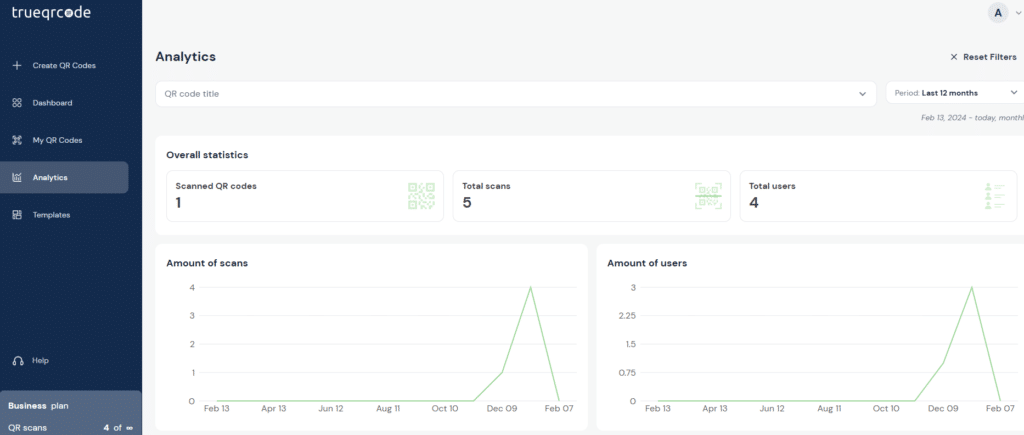
Dynamic QR codes provide important analytics, such as the number of scans, locations, and device types. Failing to track this data can lead to missed opportunities to improve your campaigns. Use the analytics tools provided by your QR code platform to monitor performance and identify trends in user activity.
For example, if there are few scans at certain locations, you may need to adjust your positioning strategy. Analyzing this data helps you improve your campaigns and optimize your return on investment (ROI).
4. Overloading the QR code with too much information
Including large amounts of data, such as long URLs or extensive content, can make QR codes too dense and difficult to scan. Instead, use short URLs or link-shortening services to keep the code simple and effective.
Dynamic QR codes are great for connecting users to external content, so don’t include too much information directly in the code. This not only improves scanability but also enhances the user experience by directing them to a clean, mobile-optimized landing page.
5. Do not test QR codes before launch
Implementing QR codes without extensive testing can result in broken links, slow redirects, or poor performance, which can frustrate users and undermine the reliability of your campaign.
Consistently test your QR codes on different devices and scanning apps to ensure they work properly across various platforms. Look for common issues such as broken links, compatibility problems, or slow loading speeds. Testing ensures a seamless user experience and minimizes potential challenges.
By addressing these common mistakes, you can create dynamic QR codes that are efficient, user-friendly, and aligned with your campaign objectives.
How do you choose the right dynamic QR code software for your needs?
There are countless QR code generators on the market. Here’s how to choose the right one.
Focus on key features for maximum functionality
When choosing dynamic QR code software, look for platforms that offer key features such as real-time analytics, editable codes, and robust customization options. With real-time analytics, you can track scan locations, devices used, and user actions to improve your campaigns. Editable codes let you update the linked content without having to reprint them, saving you time and resources.
Customization options, including corporate colors, logos, and call-to-action buttons, strengthen your brand identity. Security measures such as password protection and expiration dates are essential for protecting sensitive information.
Compare prices and plans to find the best value
Evaluate the cost of the software and determine whether it meets your specific requirements. Many platforms offer tiered pricing or subscription options, depending on the number of codes and features required.
Choose software like TrueQRcode.com, which offers a variety of plans and a freemium version, so you can see it in action.
Prioritize ease of use with an intuitive user interface
Choose software that makes generating QR codes easy with an intuitive interface. With an optimized design, team members with varying skill levels can effectively create, customize, and verify QR codes without a steep learning curve.
TrueQRcode.com’s user-friendly platform simplifies processes and boosts efficiency, allowing you to focus on refining your campaigns.
Check for seamless integration with your tools
Make sure the software is compatible with your current systems, such as CRMs, marketing platforms, or analytics tools. Thanks to seamless integration, you can link QR code campaigns directly to your workflows, making it easier to track performance and manage data all within a single system. This improves operational efficiency and ensures a cohesive strategy.
Choose software with reliable customer service
Reliable customer support is crucial for resolving technical issues or optimizing the software’s capabilities. Look for platforms that offer dedicated support via live chat, email, or knowledge bases. TrueQRcode.com offers first-class support to help users troubleshoot issues, use advanced features, and efficiently optimize their QR campaigns.
Conclusion
Dynamic QR codes make it easy to connect an offline audience to digital experiences. With the right strategy and software, they become a robust, scalable tool for increasing engagement, streamlining activities, and successfully achieving your goals.
Try Trueqrcode QR code generator to streamline your QR code campaigns. Get started for FREE.
