Want to give your audience quick access to multiple links with just one QR scan? With Trueqrcode, you can create a Multi-Link QR code in just a few easy steps. Whether you want to share your website, contact form, social media profiles, product page, or downloads, this type of QR code lets you put everything in one place.
This guide walks you through how to create your own Multi-Link QR code using the Trueqrcode platform. No technical skills required. Just a few minutes of setup, and your code is ready to print or share.
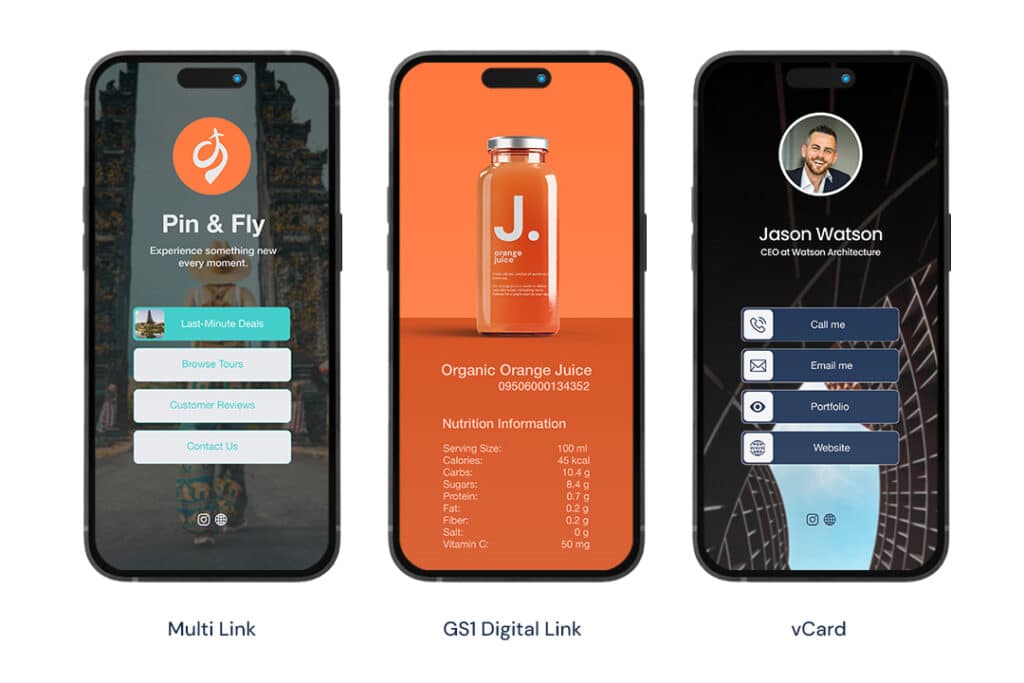
What Is a Multi-Link QR Code?
Before we start building, let’s recap what a Multi-Link QR code is. When someone scans this type of code, they are not sent to a single page. Instead, they are shown a simple landing page with a list of clickable links that you define.
You can customize the titles, subtitles, icons, and order of these links. This means that with one scan, a user can choose whether they want to visit your website, follow you on Instagram, download your app, or contact your support team. The best part? You can edit the links anytime without changing the QR code itself.
Why Use Trueqrcode to Create Your Multi-Link QR Code?
Trueqrcode makes the entire process fast, reliable, and user-friendly. Here’s why users love the platform:
- Simple dashboard interface
- Fully customizable landing page
- Unlimited link updates
- Real-time analytics
- Branding and styling options
- No coding needed
Now let’s dive into the step-by-step instructions.
Step-by-Step: How to Create a Multi-Link QR Code With Trueqrcode
1. Create a Free Account or Log In
Go to Trueqrcode’s Multi-Link QR Code Generator and click on “Get Started.” If you don’t have an account yet, you can create one for free using your email address. If you already have an account, simply log in.
Once inside the dashboard, you’ll see all available QR code types. Choose the one labeled “Multi-Link.”
2. Add a Title and Description for Your Landing Page
This is the first thing your users will see after scanning. Add a short, clear title that explains what your links are about for example, “Explore Our Digital Content” or “Follow Us Online.” You can also add a subtitle or brief intro text to guide the user.
Keep it simple, and focus on what value you’re offering.
3. Add Your Links
Now it’s time to build your list of links. Click “Add Link” and enter the following for each:
Link Title (e.g., “Visit Our Website”)
Subtitle or short description (optional)
Destination URL (e.g., https://yourcompany.com)
Icon or image (optional but helpful for branding)
Repeat this for every destination you want to include. You can add as many as you like, such as:
- Company website
- Instagram profile
- Facebook page
- Online store
- Booking page
- Contact form
- PDF brochure download
- YouTube channel
4. Customize the Look and Feel
Want your QR code landing page to reflect your brand? You can easily adjust:
- Background color
- Upload images
- Font style and size
- Button color and shape
- Logo placement
This helps you create a consistent experience that matches your website or print materials.
5. Generate and Download Your QR Code
Once you are happy with the layout and links, click “Generate QR Code.” The platform will create a scannable QR code that links directly to your landing page. You can then:
- Download the QR code as PNG or SVG
- Add it to your flyer, packaging, menu, or website
- Test it using your phone camera to make sure everything works
Remember, this QR code will always stay valid. If you want to change links later, simply update the landing page. No need to generate a new code.
6. Track Performance With Analytics
Once your QR code is live and being scanned, Trueqrcode starts collecting valuable data. You can view:
- Number of scans
- Time and date of scans
- Device type (mobile, desktop)
- Location of users
- Clicks per individual link
This helps you see what content your audience engages with most and refine your messaging accordingly.
7. Edit Anytime Without Reprinting
Need to update a link? Want to remove or reorder items? You can go back into your dashboard and make changes at any time. The QR code itself never changes, which means your physical materials (like posters, packaging, and signs) stay valid long term.
Use Case Example
Let’s say you’re an artist promoting your latest release. Your Multi-Link QR code could contain:
- Link to Spotify
- Link to YouTube video
- Link to your merch store
- Link to your event calendar
- Link to join your newsletter
You print the code on posters and share it on social media. Two weeks later, you want to switch the video to a new single. You don’t need a new QR code just log in and update the link. Done.

Final Thoughts
Creating a Multi-Link QR code with Trueqrcode is an easy and smart way to centralize your digital presence. Instead of limiting yourself to one URL, you offer your audience flexibility, clarity, and a better experience.
From marketing campaigns to product packaging, event promotion, or personal branding this is one of the most effective ways to deliver more value with a single scan.
Ready to try it yourself?
👉 Create Your Multi-Link QR Code Now
